
When a message arrives, the phone announces it with a short, dry buzz. It looks trivial, but that buzz hides two engineering problems that have to be solved in milliseconds: moving a mass with enough force for you to feel it and, harder still, stopping it in time. If the actuator keeps oscillating once it should not, the sensation stops being a click and becomes a soft tremor, like the one from a cheap console controller.
From the motor that spins to the magnet that resonates
The classic mechanism is the ERM (eccentric rotating mass): an off-centre weight mounted on the shaft of a small brushed motor. As it spins, it unbalances the assembly and the chassis vibrates. It is cheap and delivers plenty of amplitude, but it has two flaws: it takes 50 to 150 milliseconds to spin up and it cannot control frequency. You can only raise or lower the voltage, meaning it vibrates harder or softer, always at the same cadence.
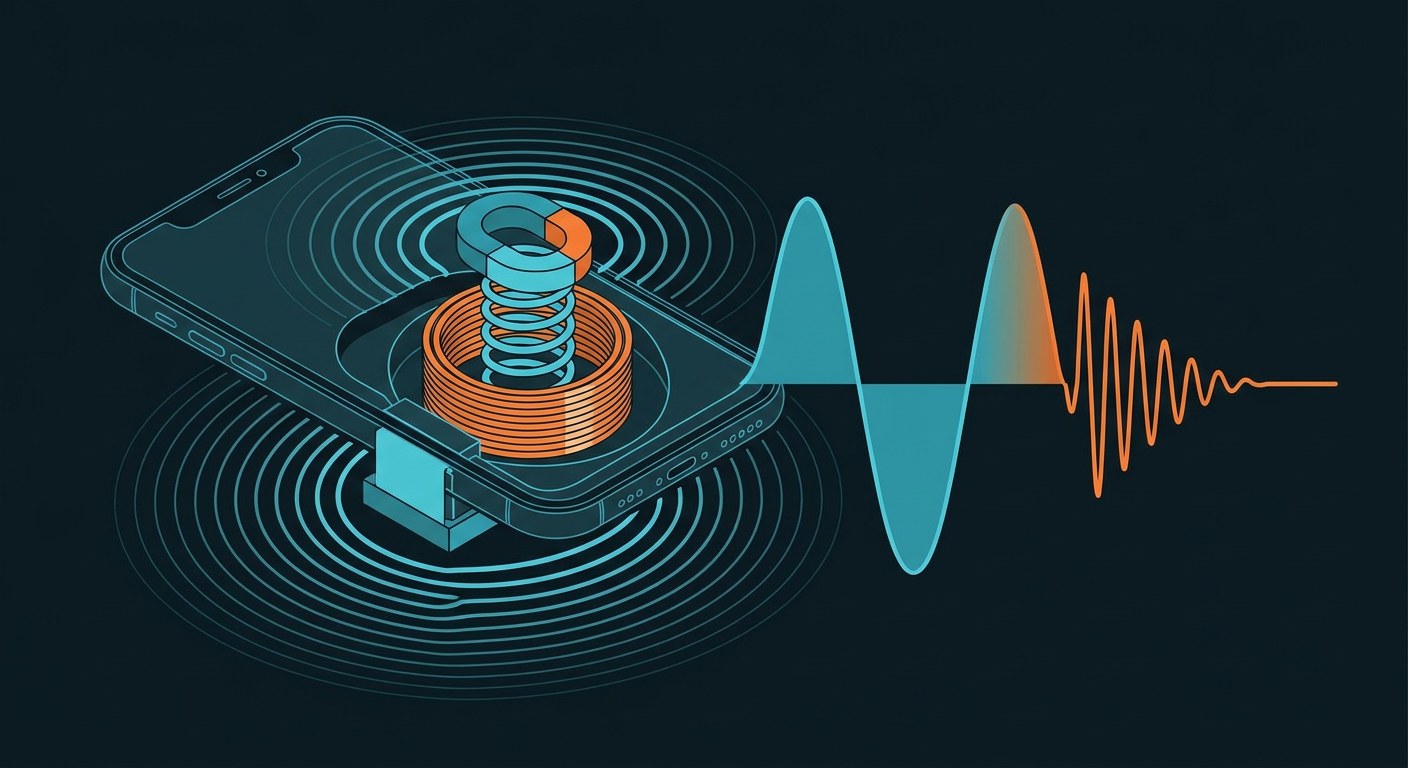
Today’s standard in mid-range and high-end phones is the LRA (linear resonant actuator). Nothing spins here: a magnet travels inside a gap, suspended by two springs, with a fixed coil around it. When alternating current runs through the coil, the magnetic field pushes the magnet one way and then the other. If the current oscillates exactly at the system’s mechanical resonance frequency — typically between 150 and 235 hertz, with common values around 170 — the mass reaches its full travel with very little energy. It is the same principle that lets you keep a swing moving with gentle pushes as long as they stay in time.
Resonance is not a fixed number
The appeal of the LRA is also its complication: the resonance frequency depends on the mass, the stiffness of the springs and the damping, and all of that changes with temperature, manufacturing tolerance and, above all, orientation. With the phone flat on a table, gravity pulls the magnet along one axis; held upright, it acts along another. The same actuator can resonate at 168 hertz in one posture and 178 in the opposite one.
That is why modern controllers work in a closed loop. Chips such as the DRV2605 or the DRV2624, which talk to the processor over I2C, do not merely amplify a signal: they measure the back electromotive force the moving magnet generates (back-EMF), proportional to its speed, and from it work out where resonance sits at that instant. The firmware adjusts the drive frequency to follow it. Without that adjustment, the same notification would feel strong in your hand and weak on the table.
Braking costs more than starting
The second half of the problem is braking. A well-tuned LRA goes from rest to full amplitude in two cycles: at 170 hertz a cycle lasts about 5.9 milliseconds, so we are talking 12 to 15 milliseconds in total. Stopping it, however, does not happen on its own. If the current is cut, the spring returns the energy and the magnet keeps oscillating, with ever less travel, for tens of milliseconds.
The fix is called active braking: a drive pulse in opposite phase, half an inverted cycle that turns kinetic energy back into current and halts the mass in a couple of milliseconds. A well-made “click” is exactly that, a short pull followed by a hard stop, spaced 5 to 15 milliseconds apart. Making that gap longer or shorter completely changes the perceived feel, which is why effect libraries ship dozens of different waveforms. All of it happens with current peaks of 100 to 250 milliamps for a few milliseconds, an energy cost that is negligible next to the display’s.
The twenty-millisecond budget
For the buzz to feel glued to your finger, a good actuator is not enough: the whole chain has to arrive on time. The touch panel samples fingers 120 to 240 times per second, that is, every 4 or 8 milliseconds; the event crosses the operating system, the app decides which effect to fire and the haptic controller executes it. If the total exceeds 20 or 30 milliseconds, the brain stops linking the vibration to the touch. Android recommends single-digit latency budgets for critical interactions, and on iOS the haptic engine is primed before the touch happens so it never has to start cold.
From vibration to the feel of a surface
Wideband actuators (piezoelectric, or dual-resonance LRAs) stretch the range up to 50-500 hertz and allow something more ambitious: simulating textures. By modulating the vibration according to how the finger moves across the screen, a flat surface can be made to feel like it has ridges, or a slider can be made to “catch” at given positions. This is where the API comes in: Core Haptics, on iOS, lets developers describe two parameters as curves over time, intensity and sharpness (tied to frequency content), and store them in AHAP files; on Android, VibrationEffect defines waveforms with amplitudes, while each vendor’s composition API exposes primitives such as “tick” or “click” tuned to its specific actuator.
The upshot is that two phones running the same operating system do not vibrate alike: what gets programmed is an intention, and the controller is what translates it into voltages across a mass weighing a few grams. Next time your phone buzzes, remember it is not trembling: it is shoving a magnet and braking it in time.