The days of 12-character passwords with uppercase letters, numbers and symbols are numbered. Passkeys —or access keys— have arrived to become the authentication standard of the future, and 2026 is turning out to be the year of their mass adoption.
What exactly are passkeys?
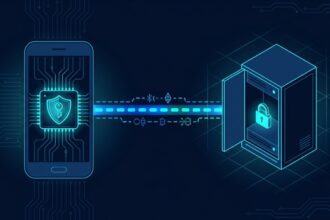
A passkey is a pair of cryptographic keys (one public and one private) that lets you log in to apps and websites without having to type a password. The private key never leaves your device —it is stored in a secure enclave— and authentication is carried out via biometrics (fingerprint or facial recognition) or a PIN. In other words, to access your Google, Apple or Microsoft account you no longer need to remember a password: you simply use your face or your finger.
Why is it better than passwords?
The problem with passwords is that they can be stolen, guessed or intercepted. Every year millions of leaked credentials end up on dark web forums. With passkeys, even if an attacker obtains the server’s public key, they can do nothing with it because they need the private key that is physically on your device.
In addition, passkeys are phishing-resistant: because they are tied to the specific domain for which they were created, a fake site will not be able to trick your browser into using them. Goodbye to the “your account has been compromised, click here” emails.
The ecosystem in 2026
Today, the three major operating systems —iOS/iPadOS 18+, Android 16+ and Windows 12— support passkeys natively. Password managers such as 1Password, Bitwarden and Dashlane also integrate them. Google, Apple, Microsoft, PayPal, WhatsApp, GitHub and hundreds of other services already allow you to use them as your primary sign-in method.
It is estimated that by the end of 2026 more than 60% of logins to digital services will be done with passkeys, compared to 15% in 2024.
How to start using them today
If you have an iPhone or iPad, go to Settings > Passwords > Passkeys. On Android, open Google Password Manager. On Windows 12, look in Settings > Accounts > Passkeys. From there you can see which services you have registered and add new ones.
Whenever a compatible service offers you “use passkey” instead of a password, accept it. Your device will ask you for biometric authentication and within seconds you’ll be in, without typing anything.
What if I lose my device?
That’s the million-dollar question. If you lose your phone, the passkeys stored in your cloud password manager (iCloud Keychain, Google Password Manager, Bitwarden) sync with your other devices. You can also use a recovery key or set up a second physical factor such as a USB security key (FIDO2).
Benefits at a glance
- 🛡️ Impossible to steal through phishing or data leaks
- 🔐 Biometric authentication: fast and convenient
- 📱 They work on all your devices if you use a cloud manager
- 🌐 Open standard (FIDO Alliance / WebAuthn)
- ⟳ Forget about changing passwords every 3 months
Conclusion
Passkeys are not the future: they are the present. If you still haven’t tried logging in without typing a password, 2026 is the perfect time to make the leap. Security improves, the user experience improves too, and little by little we will get rid of one of the biggest sources of vulnerabilities on the internet: weak and reused passwords.