When you open a complex application in your browser, most of the time JavaScript handles everything. But a format arrived to make sure that is not the only language your browser understands: WebAssembly. It is not a programming language as such, but a bytecode (a compact intermediate code that the CPU processes indirectly, through an interpreter or a compiler) designed to run safely and quickly on the client.
From the compiler to the module
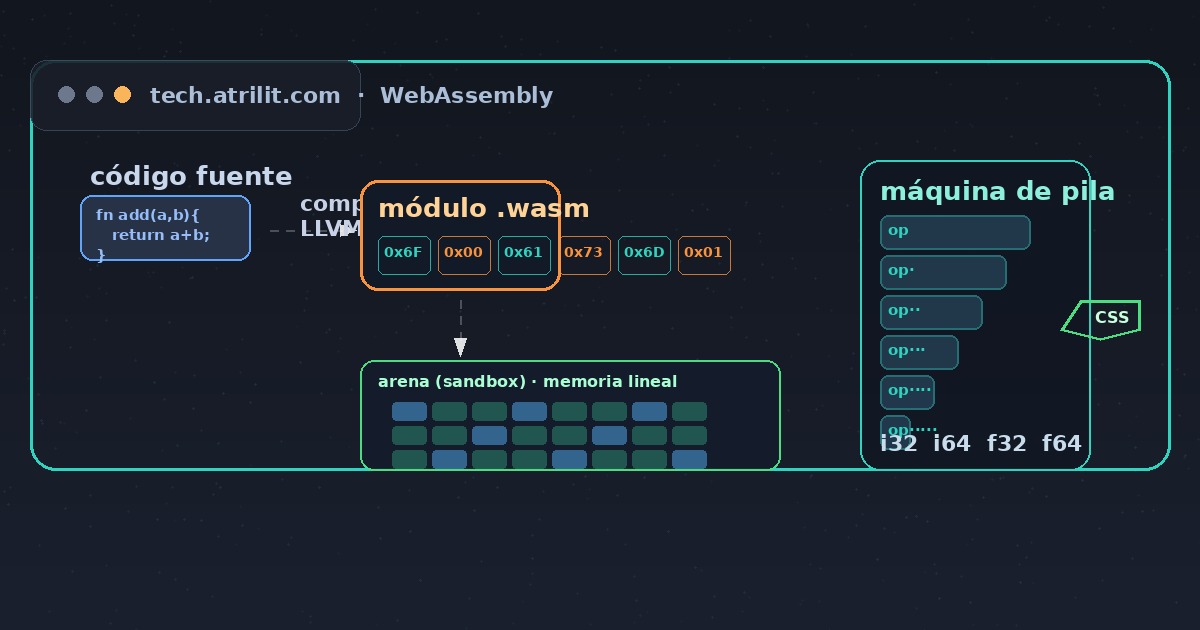
When a developer writes in C or Rust, a compiler (a program that translates source code into machine code) turns that text into a .wasm module. The toolchain uses the LLVM compiler (a reusable compilation infrastructure) with the wasm32-unknown-unknown target: it produces a binary meant for the WebAssembly virtual machine instead of a specific processor.
That module does not depend on the chip vendor. The same bytecode runs on an ARM laptop and on an x86 server, because it is the browser that translates it into real instructions. That is why WebAssembly was called “the assembler of the Web”: a common destination for many languages.
An arena with linear memory
The key to its security is the sandbox (an isolated environment that limits what the code can touch). The module has no direct access to the system or to the rest of the browser. All memory lives in a linear space (a single contiguous address block) that the module itself declares when loaded.
The code inside the module can only read and write in that memory, through instructions that check bounds on every access. An out-of-range access does not corrupt the rest of the system: it simply throws an exception and aborts that execution. That model contrasts with C, where a stray pointer can overwrite arbitrary memory of the process.
Stack machine and explicit types
WebAssembly works as a stack machine (an architecture in which operations take their operands from the top of a stack). There are no programmer-defined registers in the bytecode: each instruction pushes and pops values from that stack. The types are few and explicit: i32, i64, f32, f64 for numbers, plus vector types for SIMD (a technique that executes the same operation on several pieces of data at once), very useful in games and image processing.
Because it lacks a native string or object type, WebAssembly brings no garbage collector (a process that automatically reclaims memory no longer in use). Memory management stays in the hands of whoever wrote the original code, with allocation functions described as imports and exports, the ABI (the conventional boundary between modules and host).
How it talks to the browser
The module does not run fully alone: it communicates with the host through imports and exports. The browser can export functions the module calls, such as requesting memory or accessing data; in turn, the module exports functions that JavaScript invokes. That boundary lets you mix costly logic written in Rust with a JavaScript interface.
For operating systems and servers there is WASI (a standard layer that gives modules uniform access to files and the clock), which turns WebAssembly into a candidate for portable applications (able to run unchanged in different environments) and even for edge computing functions (code that runs on servers close to the user).
Fast, but not magic
The browser compiles at load time the bytecode into native machine code (JIT, a compiler that translates during execution, or AOT precompilation). Because the types are known in advance, the compiler can emit efficient code in one pass, without the speculative optimizations JavaScript must repeat. Even so, it is not always as fast as native code: memory bounds checking and the stack model add cost, and performance shines above all in intense numeric computation.
Fifteen years after its birth as an experimental project, WebAssembly has gone from curiosity to pillar: it is the foundation on which games, image editors, encryption systems and compression engines run inside a tab. The browser stopped being an interpreter and became a platform.