You ask the disk to write a few bytes in a specific place, and you believe that is exactly what it does. In an SSD (solid-state drive, storage without moving parts that uses flash memory) that belief is almost always false. Behind it lies an abstraction layer called the flash translation layer, which decides for you where your data actually lands. It does so to keep the drive from dying of exhaustion within months. This article opens that black box: flash memory, pages and blocks, wear, wear leveling, TRIM, and write amplification.
Flash memory does not tolerate the same writes as a disk
The flash memory in your SSD stores information in cells made of floating-gate transistors that trap electrical charge; the presence or absence of that charge encodes the 1 or the 0. Unlike a magnetic disk, which you can rewrite millions of times, each flash cell degrades a little with every programming (writing) and erasing cycle. This is measured in P/E cycles (program/erase cycles), ranging from a few thousand on triple-level-cell (TLC) drives to tens of thousands on single-level-cell (SLC) ones. Past that limit, the cell can no longer hold charge reliably.
The problem is that you cannot write just anywhere, or whenever you want. Flash is organized into pages (the unit of read/write, typically 4 KiB) grouped into blocks (the unit of erasure, typically 2 to 8 MiB). And here is the awkward key: you can write to a page without touching its neighbours, but you can only erase an entire block at once. Rewriting a single page of a block whose pages are all occupied forces you to copy the whole block elsewhere, erase it, and write it back.
The flash translation layer: an intermediary that lies with good intentions
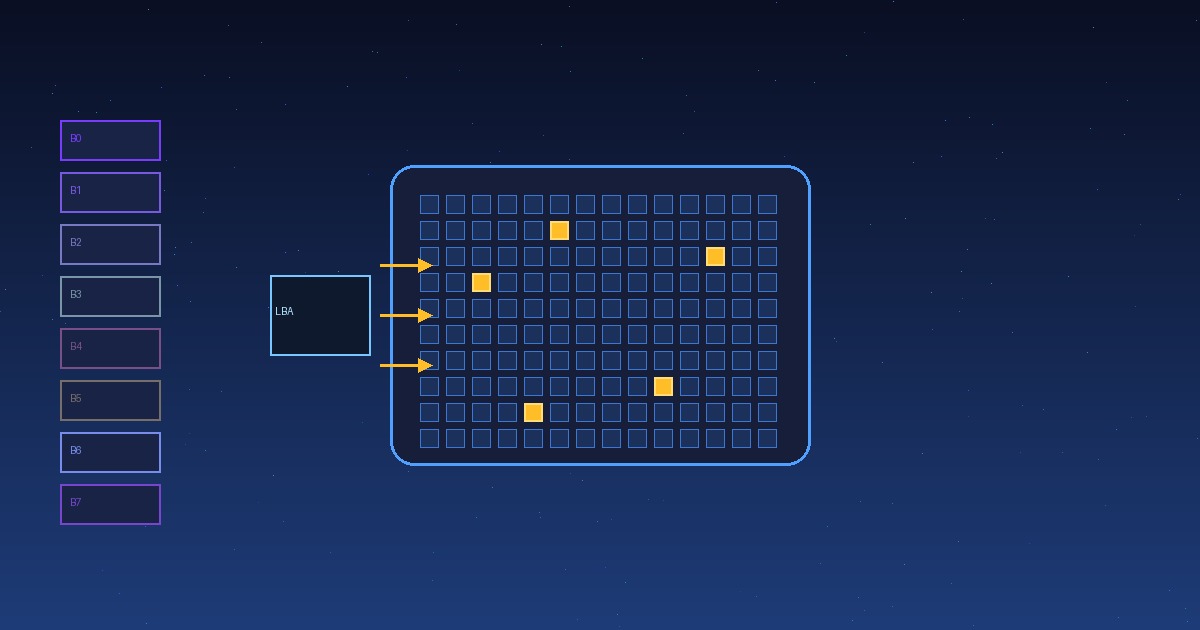
The operating system believes the SSD is an ordinary block device, with logical addresses from 0 to N. The FTL (flash translation layer) maps that logical address to a real physical address inside the chips. Internally it keeps a translation map, a table saying which LBA lives in which physical page. When the OS asks to overwrite a logical block, the FTL usually writes the new data into an empty physical page and updates the map, instead of pounding the old page. That deferred bookkeeping is called copy-on-write: the new version is written elsewhere and the previous one is marked stale.
That map is why an SSD never deletes data instantly and why “worn-out” drives slow everything down: rebuilding or reading it takes time. Most modern SSDs keep the map in RAM and back it up to flash periodically.
Wear leveling: spreading the wear so nothing dies first
If data were always written to the same pages (those the OS uses most, such as indexes or logs), those cells would wear out within weeks while the rest stayed untouched. That is what wear leveling prevents: the controller distributes erase cycles evenly across all blocks. There are two variants:
- Dynamic: only moves data whose stale copies are about to be rewritten soon.
- Static: also moves “cold” data (that never changes, like the installed OS) toward less-worn blocks to equalize the cycle count across the whole drive. It is costlier but extends life noticeably.
Each block carries an erase counter (the erase count), and the controller picks the block with the lowest count as the next candidate to erase. In theory, then, all cells die at more or less the same time.
Managing space: garbage collection and over-provisioning
Because flash only erases whole blocks, the controller must reclaim blocks with dead (stale) pages to free them. That process is garbage collection: it takes a block with some valid and some stale pages, reads the valid ones, rewrites them into a clean block, and erases the original. That extra work, reading and rewriting data the user never asked for, is write amplification, measured as the number of real physical writes divided by the logical writes the system requested. Values of 3 to 10 are common; good drives go below 1.5.
So that garbage collection has room to move data, manufacturers keep a portion of the drive unreported to the OS: over-provisioning, usually 7 to 28% of capacity. It is not waste; it is the “free room” that keeps the drive from truly filling up and maintains a stable write speed.
TRIM: telling the drive a block no longer matters
When you delete a file, the OS marks its logical blocks as free, but the SSD does not know the physical pages underneath are useless until it is asked for them again. The TRIM command (through the ATA interface the drive uses to communicate) closes that gap: it tells the SSD “these logical addresses no longer hold useful data”, so the FTL marks their pages stale immediately and garbage collection reuses them without copying garbage. In NVMe, an equivalent command called deallocate is used. Without TRIM, an SSD you never fill up ends up copying and cleaning dead data over and over, with the resulting loss of performance.
Why all this matters to you
Understanding the FTL explains three things you notice every day. First, a “full” SSD loses speed, because there are fewer blank pages and garbage collection kicks in. Second, the controller’s firmware is decisive: two drives with the same chip can perform differently depending on how they map and level. And third, “deleting” a file on an SSD deletes nothing physical until the FTL decides to reuse those pages, something worth knowing before giving away or selling a drive. The abstraction that protects your hardware asks, in return, that you understand it a little so there are no surprises.